
Portable • No install • Plug & record

Endoscopy capture that fits in your pocket.

Carry MediCap on any USB drive or external SSD. Plug into any Windows PC, hit record— optionally overlay patient info, auto-stop long recordings, and tune freeze/idle detection with your own presets. Available in 6 languages.

Download for Windows See features
Portable

No install, plug-&-play

Run from USB/external disk anywhere.

Overlay

Optional patient info

Watermark/overlay toggle per case.

Autostop

Auto trim on idle

Prevents “forgot to stop” recordings.
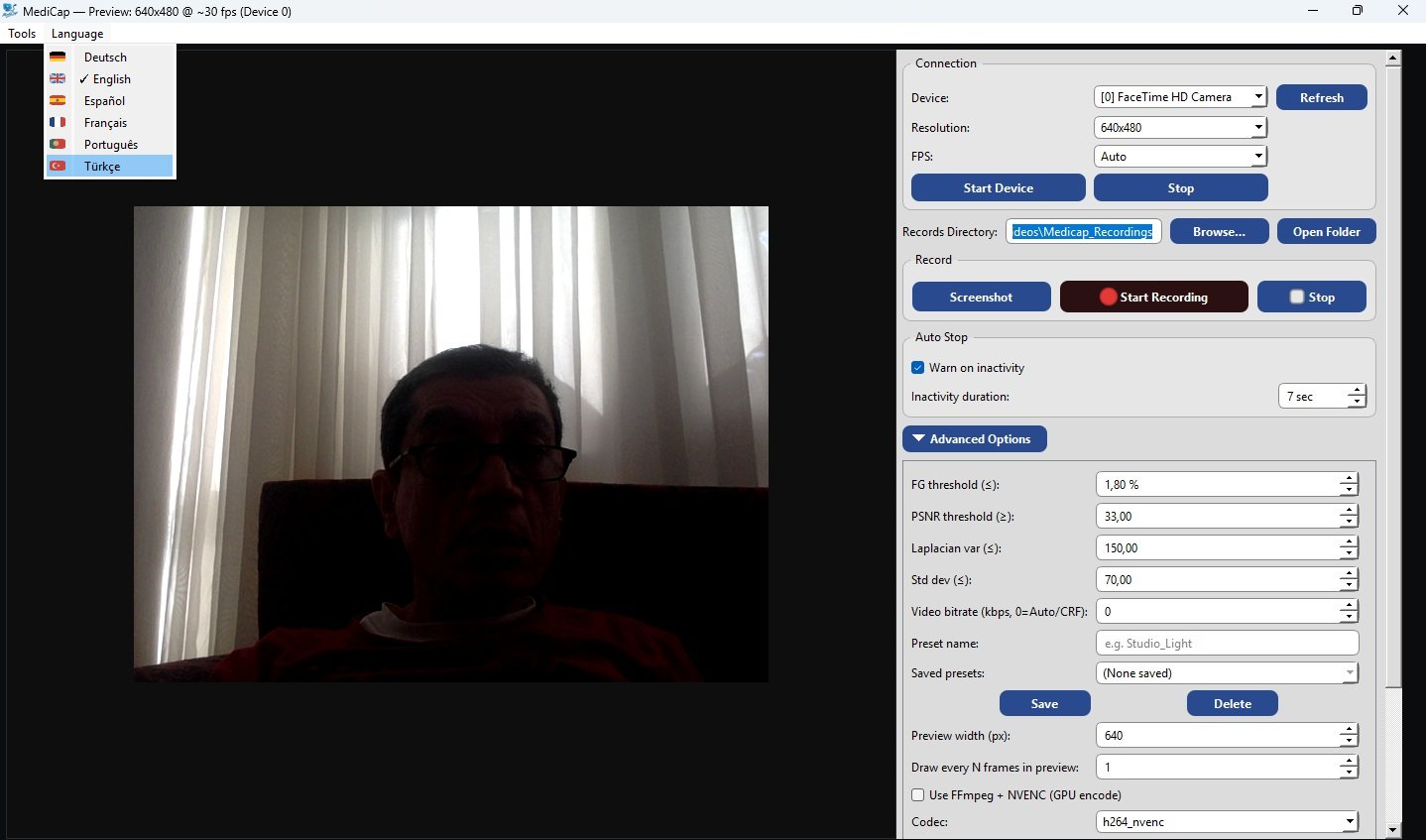
MediCap UI screenshot

Why MediCap?

Built for clinics and ORs—simple, portable, and robust. Keep files local; add metadata when you need it.

  • Portable, zero-install
    Run from a USB stick or external SSD. “Plug & Record”.
  • Optional patient overlay
    Embed patient name/ID on video when enabled.
  • Auto-stop & tail trim
    Avoid endless files if stop is forgotten.
  • Freeze/idle calibration
    Calibrate the app what “frozen/idle” looks like—live or from file.
  • Save presets
    Store calibration parameters as reusable presets.
  • Multilingual User Interface (6 Common Languages)
    English, Türkçe, Deutsch, Français, Español, Português.

Technical highlights

UVC / HDMI / DVI

USB3 capture cards supported.

OpenCV + FFmpeg

Hardware NVENC; x264 fallback.

1080p presets

30/60 fps profiles; custom bitrate.

Privacy-first

Local storage; no cloud by default.

Hotkeys: R record / S stop / Space snapshot

Download

Windows 10/11 • 64-bit • ~144 MB (incl. FFMpeg) • Portable (no install)

Tip: Use a USB3 UVC capture card and SSD storage for best performance.

System requirements

  • CPU: Intel i5 (or better) • RAM: ≥ 8 GB
  • GPU: NVIDIA with NVENC (optional)
  • Disk: SSD recommended; ≥ 10 GB free
  • Capture: UVC USB3 / HDMI/DVI via adapter

Privacy & Compliance

MediCap stores recordings only to locations you choose. No data leaves your machine unless you explicitly export it. You can configure retention and overlay policies.

Contact

Email: support@medicap.app • Docs: Documentation